
Taking Quizzes
Quizzes are auto-graded multiple-choice tests. You see your score immediately after submitting.
Finding a Quiz
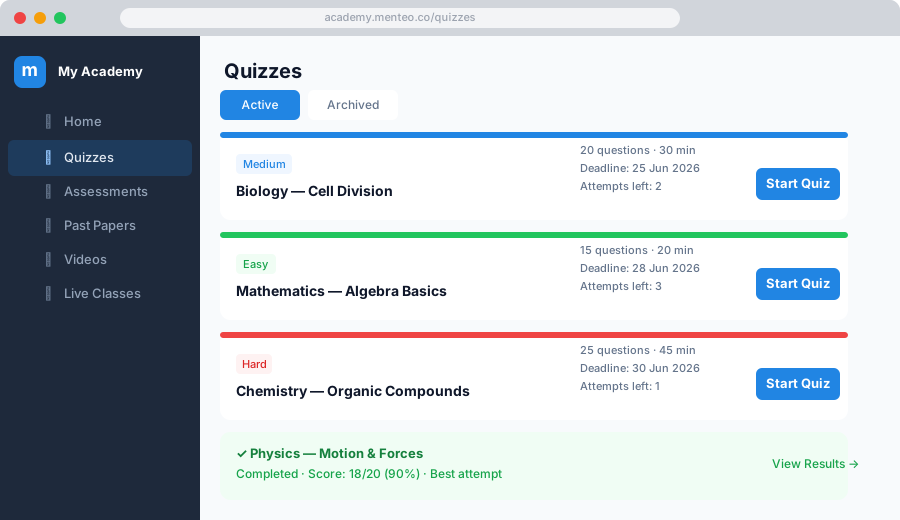
- Click Quizzes in the sidebar
- Quizzes are listed with:
- Title and description
- Difficulty — Easy / Medium / Hard
- Time limit — How many minutes you have
- Deadline — Last date to attempt
- Attempts remaining — How many tries you have left
Starting a Quiz
- Click the quiz title
- Read the instructions and time limit
- Click Start Quiz
WARNING
The timer starts immediately when you click Start Quiz. Make sure you're ready before clicking.
Answering Questions
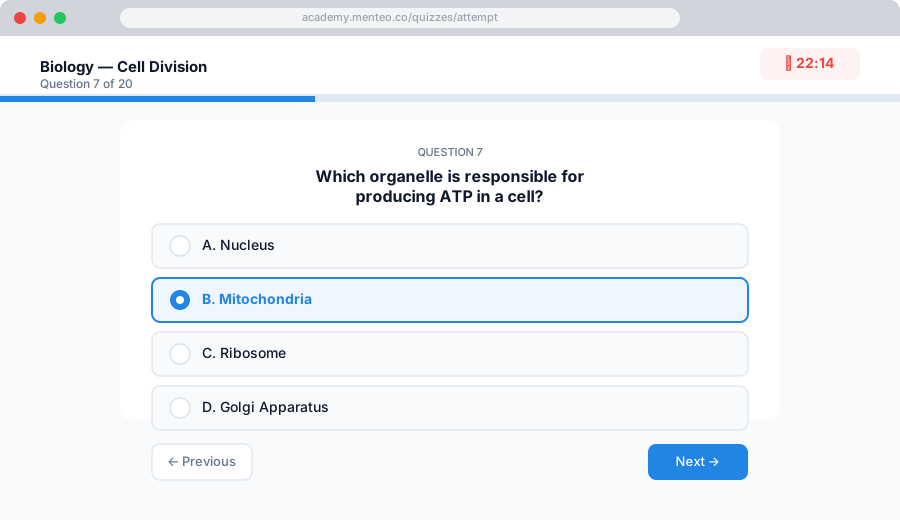
- Click an answer option to select it
- You can change your answer any time before submitting
- If a per-question time limit is set, each question has its own countdown — you'll move to the next question automatically when time runs out
Submitting
- Click Submit Quiz when you've answered all questions
- If time runs out, the quiz is auto-submitted with your current answers
Viewing Your Results
After submitting you'll see:
- Your score (e.g. 8 / 10)
- Accuracy percentage
- Each question marked correct ✓ or incorrect ✗
- Explanations for each answer (if your mentor added them)
Retaking a Quiz
If your mentor allows multiple attempts:
- Return to the quiz page
- Click Retake Quiz
- Your best score is shown on your dashboard
TIP
Check the attempts remaining counter before starting — if it shows 0 you've used all your tries.
Quiz History
Go to Quizzes → click a quiz → My Attempts to see a full history of all your attempts with scores and timestamps.