
Submitting Assessments
Assessments are PDF-based submissions. You download the question paper, answer it (on paper or digitally), then upload your answer as a PDF.
Finding an Assessment
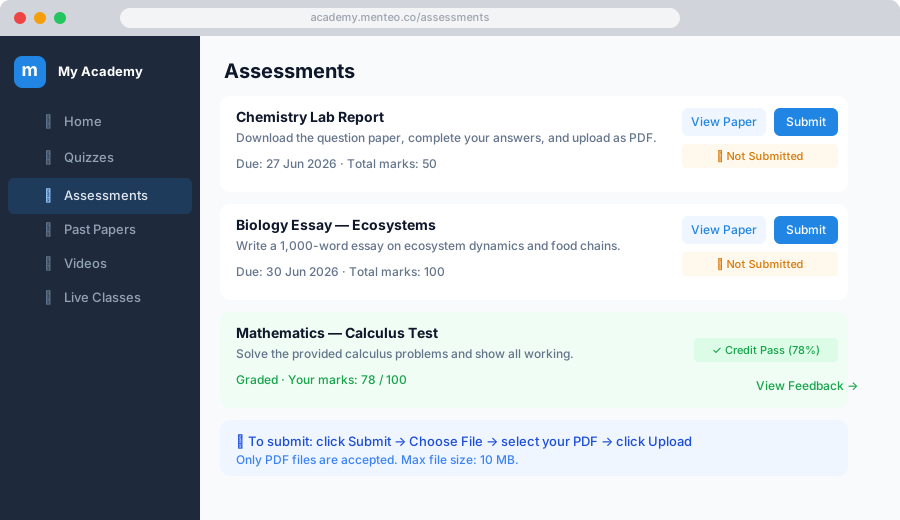
- Click Assessments in the sidebar
- Each assessment shows:
- Title and description
- Due date — Submit before this time
- Total marks — Maximum marks available
- Status — Not submitted / Submitted / Graded
Downloading the Question Paper
- Click the assessment title
- Click View Paper or Download to get the question paper PDF
- Complete your answers (on paper or using a tablet/PDF editor)
Submitting Your Answer
- Click the assessment title
- Click Submit Answer
- Click Choose File and select your answer PDF
- Click Submit
WARNING
- Only PDF files are accepted
- Submit before the deadline — late submissions may not be accepted
- You can resubmit before the deadline if your mentor allows it
Checking Your Grade
Once your mentor marks your submission:
- You'll receive a notification (email + in-app)
- Go to Assessments → click the assessment
- See:
- Your marks (e.g. 72 / 100)
- Grade label — Distinction Pass, Credit Pass, etc.
- Feedback from your mentor
Grade Scale
| Grade | Percentage |
|---|---|
| Distinction Pass | 75% and above |
| Very Good Pass | 65 – 74% |
| Credit Pass | 50 – 64% |
| Ordinary Pass | 35 – 49% |
| Failure | Below 35% |
Submission History
Go to Assessments → My Submissions to see all your past submissions with grades and feedback in one place.